
Play Ace Lightning Online
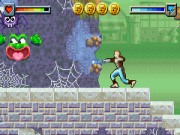
Guide Mark through levels, battle enemies, and collect Chroma Wheel shards.
🎮 Game Controls
Make sure the game window is active to play.
- Move
- Btn A
- Btn B
- Btn X
- Btn Y
- / L / R
- Start
- Select
About Ace Lightning
I picked up Ace Lightning for the Game Boy Advance back when it was new, a tie in with the live action TV show. It was published by BBC Multimedia, which felt like an unusual choice for a game. This was the early 2000s, a time when licensed platformers were everywhere on the GBA, and this one fit right into that crowded field.
You control a teenager named Mark Hollander who gets pulled into a video game world. Your main goal is to help the hero, Ace Lightning, stop the villainous Lord Fear. The gameplay involves moving through levels screen by screen, using a sword for close combat and a lightning bolt for ranged attacks. You explore environments, fight off various enemies, and collect shards of the magical Chroma Wheel to progress. The pacing is fairly straightforward, though some enemy patterns can be tricky to learn at first. It feels like a straightforward action adventure where you are constantly switching between your melee and projectile weapons to clear a path.
Must-play games
-
 Jump, punch, and use weapons to knock opponents off platforms in chaotic multiplayer battles.
 -
Jump, crush enemies, and collect coins to reach the exit in this platformer.
-
Explore a vast planet, find power-ups, and battle challenging bosses.
-
Choose a fighter and battle opponents in one-on-one matches with brutal moves.
-
Explore worlds, solve puzzles, defeat enemies, and rescue Princess Zelda.


 Sonic
Sonic Pac-man
 Pokemon
 Ninja Turtles
 Star Wars
 Angry Birds